I was checking my Google Analytics statistics for today, and have become quite amused over the search criteria someone used to arrive at my site. Apparently, they were searching on MSN for T.D. Jakes is Reptilian. And strangely enough, this gets my blog in the top 10 results. I just wonder what kind of content this person was really looking for? Strange stuff indeed.
Tuesday, December 27, 2005


New Display For Me
I broke down this evening, and finally purchased a new display for my Mac Mini. I had been using an NEC Multisync 50 for at least 5 years now on various machines, including most recently the Mac Mini. It's been a good, albeit small, monitor for my needs. A few days ago, though I began to notice that the output is becoming considerably darker than it used to be. I do a lot of video and photos, and having a good display is critical for me. So, when I noticed this, I knew I needed a new one.
Anyways, this evening, my wife and I are at Sam's, and I began looking at the displays that they have for sale. I find this one and just love it. What sold me on it though is that it has the DVI port on it. Yeah! No more need for a DVI-to-VGA adapter! And even better, it comes with the DVI cable! It also comes with the VGA cable for those less fortunate.
So far, I am quite pleased with this display. I like the black look, and the on-screen controls are pretty easy to use. I try to not purchase new computer stuff very often. I typically have a buying spree, and then I tend to not buy things for several years. Hopefully, this display will do me for some time to come.
Saturday, December 24, 2005
Merry Christmas!

Well, we just got the kids to bed, and finished up all of our Christmas gift activities for the day. We started at noon, and it is now after 11 PM.
My work began yesterday. I spent a big part of the day removing the carpet tape from the bottom of the pieces of my little boy's Thomas the Train track. You see, we got him some new parts, and of course to go along with that, we had to have a whole new layout. My finger tips are now quite sore, and I have several blisters from removing the tape. Note to anyone else out there with the bright idea to mount Thomas track with carpet tape: USE A MINIMAL AMOUNT! I had coated the bottom of each piece completely. And while it was not difficult to remove from the smooth table surface, removing the tape from the wooden track pieces was MUCH MORE DIFFICULT!
Then once that was done, I had to get the new layout configured. His table is not that large, so coming up with a new layout with the new pieces was quite a challenge. But after many hours, and a clever suggestion from my wife, I was able to get it to be everything that I wanted, and was able to use all of the new stuff, and a vast majority of most of the track.
Then comes today. We started at 8am getting the house ready for the guests, and doing some last minute errands to the store for some final items. Surprisingly, Wal-Mart wasn't all that busy at 9:30am. Yeah! Once that was done, we called my folks in Florida on the speaker phone.
The kids opened all of their presents, and the parents were able to listen to all of the hollering and screaming. I think they enjoyed that, but I think we were able to convince them that they need to come in next year.
We ordered pizza, and I went to get that as the guests arrived. I got back, turned on the video camera (I placed it high up this time. I used our entertainment stand, and my tripod on top of that to give a high angle shot that got most of the action in the frame.) We came up with a more organized approach to the chaos this year, and we were able to get all of the gifts unwrapped in an hour and half. Notice I said, unwrapped, and not opened. We saved that for later, and did that at a much slower pace. There are still things unopened at this point.
We had some cake, and pizza, and watched Polar Express. I got to watch the first part, and then the guys left the room to have some fun with photos and video for a short while. I'll post a video from all of the fun in the next week or so. Maybe sooner if I get the time.
The guests left, and the kids with my wife's parents for a while. Kim and I spent the next little while putting together some toys, and cleaning up some. We finished up by going to visit her parents, and pick up the kids.
We came home, opened a couple more items. Two of which are pictured here. Kim and I got each other these HUGE R/C cars. I like Tony Stewart, and she likes Jimmie Johnson. We can't wait to race them. Provided the weather holds, we'll do that tomorrow, and hopefully I get some photos of them, or maybe some video. They are supposed to go quite fast. I hope so.
So, I wanted to share a little of our day with you, and to unwind from all of the activity for the day by writing this. I hope that Christmas has been good to each of you, and I hope everyone enjoys the time off to be with family.Merry Christmas!
Monday, December 19, 2005
Badonkoid
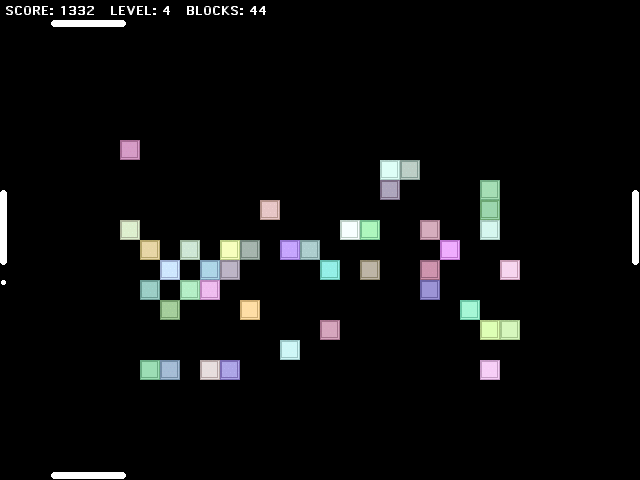
My latest game creation is called Badonkoid (Buh-DONK-oid). It's a variation on the breakout theme, but different from any that I have ever played. In Badonkoid, you control 4 paddles, one on each side of the playing field. There is a single ball that you are bouncing around the screen using these four paddles. There are no walls. Each time, you bounce the ball off of a paddle, a block is created in the playing field. The blocks are breakable. The object of the game is to continue to bounce the ball and break the most blocks. If the ball reaches any of the four walls before it is bounced, the game ends.
Scoring in the game is as follows:
Bouncing the ball off of a paddle - 1 point * (Level + 1)
Breaking a block - 10 points * (Level + 1)
The level increases every 10 blocks that are broken. As the level increases, the speed of the ball increases, until level 40. Level 40 and beyond maintain the same speed. Also, as the level increases, the number of created blocks increases. On level 0, there is 1 block created with each paddle hit. On level 1, there is 1 block created each paddle hit + 1 block created every 4 paddle hits. On level 2, there is 1 block created with each paddle hit, and 2 blocks created every 4 paddle hits. And so on and so forth for each additional level.
The paddles are controlled with the mouse. If you move the mouse toward the left or right, the top and bottom paddles are moved accordingly. If you move the mouse up and down, the left and right paddles are moved accordingly. You can move all 4 simultaneously by moving diagonal. It sounds a little odd, but as you play, it becomes a little easier to control. This game requires very good hand-eye-coordination.
Once the game loads, click the mouse button to begin. At any point during game play, you can press Q to quit. This will end the current game. If you press Q a second time, the game will close. If the game is over, or has not been started, pressing Q will simply close the game. The game can be paused by pressing the ESCAPE key. To un-pause the game, press Command-P, or un-check Pause on the Control menu and the game will resume. Clicking the mouse button once the game has ended will begin a new game.
This game should run fine on Mac OS 9 and Mac OS X.
Tuesday, December 13, 2005
Merry Christmas


For all of my readers whom I don't have mailing addresses for, here's our Christmas Card to you. May you have a wonderful Christmas Holiday, and a Very Happy New Year!
Sunday, December 11, 2005
Christmas Play

Our church Christmas Play, The First Leon, had the final performance tonight. It was the story of a little boy, Leon, who was an outcast, but once given the chance, made his own special twist to the Christmas Story. We had a great turnout for the performance despite the bad weather. The kids didn't disappoint either. They obviously put a lot of hard work into it. I know I enjoyed getting to take photos, and I am quite sure everyone there enjoyed themselves, and left blessed.
Photo of the Day

We went to a birthday party for a classmate of my daughter at Chuck E. Cheese. We all had a pretty good time. It's a great place for a birthday party. There are a lot of games for the kids, and the atmosphere is quite high energy so the kids love it.
Friday, December 09, 2005
Tetris
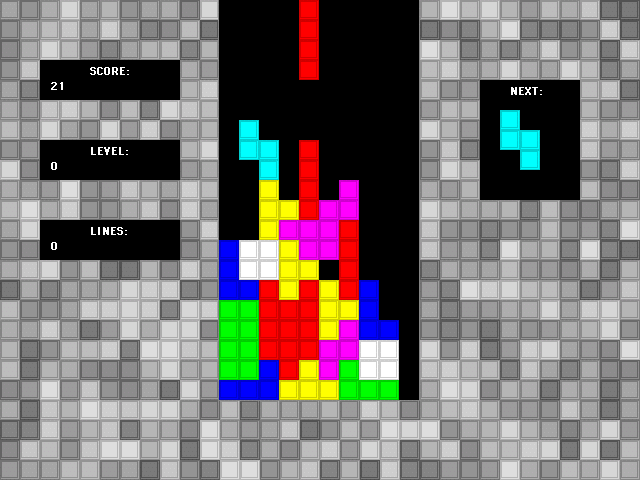
Tetris is now ready for download. Simply Un-Stuffit the archive, and put the game wherever you want on your hard drive. After the game loads, you'll be presented with the main screen.
From the main screen, you can press Q to quit, or press the spacebar to begin the game. Pressing Q anytime during the game will end the current game. Pressing Q again will quit the application. You can pause the game by pressing escape. You can resume the game by pressing Command-P. You can also select the Pause item from the Control menu. Also available on this menu are Restart and Terminate.
Pieces are moved with the arrow keys. Use the Up Arrow key to rotate the piece, Left Arrow key to move the piece left, Right Arrow key to move the piece right, and the Down Arrow key to drop the piece more rapidly. This version of Tetris implements soft-dropping, which means that the piece can moved for a second or so after it has dropped onto another piece. Be careful near the right edge as the pieces need room to be able to rotate. If you can't rotate the piece while near the edge, you are too close to the edge, move the piece to the left until you can rotate it.
Dropped Piece = Level + 1 points.
Single Line = (Level + 1) x 40 points.
Double Lines = (Level + 1) x 100 points.
Triple Lines = (Level + 1) x 300 points.
Tetris (4 Lines) = (Level + 1) x 1200 points.
The speed at which pieces drop increases as the levels increase until you reach level 49. After that, the speed remains constant.
System Requirements: Mac OS 9 or Mac OS X.
Have fun!
Tetris (a preview)
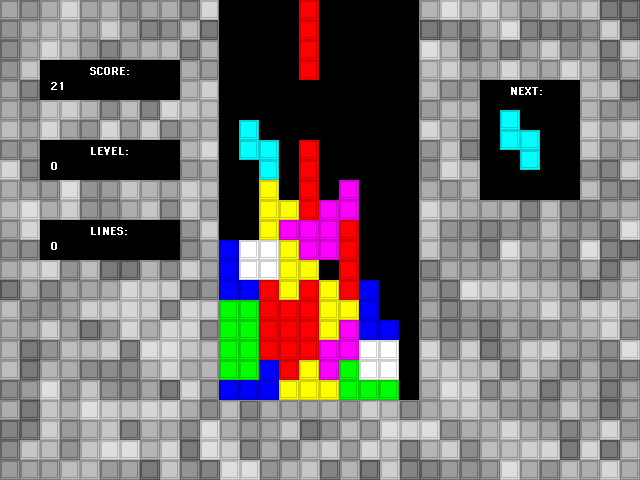
Here's a preview screenshot from my upcoming Tetris release. This weekend, providing that I get the time I expect to have, I will be releasing this for everyone to download. Right now, it is completely playable, but I want to put a little polish on it, and I also need to create the application icon for it. So for now, this screenshot will have to do.
Tuesday, December 06, 2005
Photo of the Day

This is one of the pen & inks I did in my first year of college. I went to a liberal arts college, and so, I had to take a couple of art classes. I did this one as a statement to my professor, but she didn't get it. Good thing I guess. Scored an A.
Sunday, December 04, 2005

Friday, December 02, 2005

Thursday, December 01, 2005
Photo of the Day

This clock is on the wall in my computer room. I took this shot using the Solarize effect. I have been having so much fun here lately with this mode. Solarize and macro settings combined are such great fun. If you have a camera that supports both. Try it out. It's a blast!
Subscribe to:
Posts (Atom)