Our little boy turned three a couple of weeks ago. I finally made some time, and created a video of the fun. Have a look!
Tuesday, January 31, 2006


Monday, January 30, 2006

Photo of the Day

Inspired by this post, I decided to post a photo I took of the same subject some time back. I also posted another shot of this same subject some time ago.
Friday, January 27, 2006
More on My iWeb Blog
I am slowly moving toward using iWeb for my blogging needs. I have posted a write-up on iMovie '06 over there, so go check it out. I like some of the editing features in iWeb, particularly the live spell-checker. It's much easier to use than what Blogger has. I am sure there are other blogging tools that do the same thing. It's a nice feature, in my opinion, and I think that those who don't have a similar feature are really missing out.
I also posted a new video, and I updated the previous one. I am now using a higher quality setting for the videos. The size is a little larger now, but the quality is drastically better.
Wednesday, January 25, 2006
More iWeb Blogging
Per some comments on my last iWeb blog entry, I posted a couple more entries each showing the results of different things. One entry shows that not all text is rendered as an image in iWeb. If the font is a web-friendly font like Arial, it renders as ordinary styled text. If you use an odd-ball font, then it becomes an image. I think that makes sense. Again, the resulting HTML is ugly. And you purists can whine all you want. You'd never use a WYSIWYG HTML editor anyways, so quit griping. To me, I think the fact that I get a page that looks the same on multiple browsers is quite a feat.
There are those out there who hate divs, and preach that they should use paragraph tags. Maybe... Paragraph tags add spaces where they may not be wanted. A div gives you a content area that does not have any baggage as far as rendering goes. It simply gives you a rectangle within to put content. Maybe they are overdone... so are tables in many other sites. Tables were never meant for formatting, and yet they are used time and again to accomplish just that. I'm just trying to show that iWeb can be used by folks and can get some nice results. It's true you don't have complete control, but that is not the intended audience.
All of that aside, iWeb does have a few things other than the resulting HTML that could be improved for normal Joe and Sally users. For one, there is no easy way to republish only the things that change, at least not if you are publishing to a folder. This would be a big help. It doesn't have an easy way to add comments to blogs. Notice, I didn't say it was impossible. It can be done, as you can see from my blog, but it requires you to modify the resulting HTML, adding some script code. The templates are in XML, so it should be possible to add this script automatically. I am working on this for myself, and if I figure it out, instructions will be posted for everyone.
That's it for now. Check out the two new posts, and the resulting source so you can see some cases where it renders text as images, and some cases where text is rendered as text. Comment on them all you like. I am doing this as a way for some new ideas to be brought out. If anyone would like to help me in my endeavour to add commenting to the iWeb Templates, e-mail me.
Tuesday, January 24, 2006
Comments on iWeb Generated Blogs
I have read several places where folks will blatantly claim that you can't create a blog with comments using iWeb. I hate to bust their bubble, but it can be done. Right now, it has to be done manually, but you can add comments to a blog entry created in iWeb. Here's proof. Comment all you like!
I have been working on a way to modify the templates in iWeb to generate this automatically, and I believe it can be done, but it may take me some time to reverse engineer it. The templates in iWeb are all XML based, so provided I can determine what each tag means, my theory is that I can tweak it to work. If I do figure it out, I'll post instructions on how you too can do the same thing.
Monday, January 23, 2006
More Shine
I added a Home Movies section to my website. I am slowing progressing toward the migration of this blog over there.
Sunday, January 22, 2006
Couple More WV Bloggers
Found a couple more WV bloggers in the Charleston/Huntington area.
Maybe, they'll show up at our blogger gathering on Feb. 1.
Friday, January 20, 2006
4haks.net
As I mentioned in a previous post, I am in the process of moving this blog over to iWeb for content management. I have another domain where I host photo albums, and this will become the eventual home for this blog. I used to maintain it strictly with a text editor, and I used iPhoto to create photo album pages for me. It worked well, but it wasn't what I really wanted for the look, and I was growing tired of hand-coding the markup. Well, since getting iWeb, I decided to revamp that site, removing all the content that I used to host there, and start fresh. You can see the end result by visiting 4haks.net.
Sunday, January 15, 2006
Cypress Gardens

I have been going through some of my photos from a few years ago, and importing them into iPhoto. I've been doing this partly to see how well iPhoto handles large amounts of photos, and also, so I can create new backups of my photos on DVD. I came across this shot that I took in Cypress Gardens while riding the Sunshine Sky Adventure (it had a different name then I think, though). It was late in the evening, and the sky was gorgeous. I thought it was a nice shot, and decided I would share it. This was taken with my first digital camera, a Kodak DC3200.
Must Be At Least 18
While checking out at Wal-Mart today, I had to purchase some Robitussin for our little boy who is sick. Well, the cashier scans it, and it pops-up the question "Is customer at least 18?" I just looked at the guy. Most (that means every other cashier I have ever had at Wal-mart) simply respond yes, and don't even bother asking. Well, not this guy. He said, "You kinda don't look 18." Of course, I don't "kinda look 18". I'm 32, you idiot! So, I pull out my driver's license, and show it to him. "I'll take that as a compliment", I told him. Then headed out of the store. I guess I look a lot younger than I am. Too bad I'm not a woman. Might mean more in that case.
Friday, January 13, 2006
iWeb - Hands on Review
I received my copy of iLife '06 today. I installed it after I got home. It took about 25 minutes to install, and required an additional 3gb or so of space. I had it upgrade my old iLife. I know some of have hesitated to do so, but I figure if you going in, go all in.
So, having played around with iMovie for a few, and iDVD, I thought I would try iWeb out. I didn't buy iLife for iWeb. Really had no plans on using it, especially after reading all the negativity from everyone. But I like to keep an open mind, and I judge things for myself. Good thing too! This software is great!
Now, I write software for a living, particularly web based software, so I have a good grasp on best practices, etc when it comes to developing for the web. I have also had to deal with my fair share of web-standards-compliance-pitfalls. I always try to develop in a manner that suits the majority of browsers out there, and that doesn't mean only IE. I usually do all of my testing in a non-IE browser, in particular Flock, or Firefox, as they seem to follow the standards more closely. Once it works there, I work on getting IE compliant.
But enough about that. I have been toying with iWeb now for an hour or so, just trying out the various layout functions. Every so often, I would take a peek at the generated source. And let me say, it ain't pretty! But I am not complaining. Why? Well, for one reason. This editor works. I don't need to view the source. See, that is where so many of the complaints seem to stem from. These folks think they need to look at the generated source. You don't. It works, and it renders properly. I don't have to sit and tweak until the layout is right. I just drag it around, and it works. I love it!
It's got this great feature for showing alignment markers so you can align items with other items on the page. You can rotate text. You can use any font you like. Any font! It generates images from them. Now, I am not a big fan of images for text, but I won't to clarify this. I don't like them because they are a maintenance nightmare. Normally, but not so with iWeb. While you are editing, it is just like text, but when you publish, you get images. Brilliant!
You can define opacity for images. You can add drop-shadows. You can change the angle of images, and text, and drop-shadows. You can add reflections to images. You can change the colors of everything, including shadows. You can adjust the z-index of everything. It's very simple point-n-click that works, and works the first time.
I could go on and on and continue to praise this software. It is really wonderful. If you haven't tried it, I suggest you do. This software will change the way you approach website design. In the not so distant future I am going to move this blog and begin maintaining it using iWeb. No, I am not getting a .Mac account. I don't need that. I have a domain, and I have web space, and now that I have a nice piece of software to manage my content, I am going to change.
Blogger has been great. But I think I want to move in a new direction for my blog, and iWeb is going to provide me a means to do so. When I make the switch, I hope that I can simply point this web address directly to it. I am pretty sure I can, but if not, I'll at least post an entry on where to find me. Until that time, I will continue to use Blogger.
Wednesday, January 11, 2006
Cloud Nine
Man oh Man! I haven't been this happy since... well, since I don't remember when! I just got done watching the SteveNote, and all I can say is "Wow!" Yeah, there are new mac's with intel processors. Those are cool, and they are fast, but what really has me all stirred up is iLife, in particular iMovie and iDVD, and GarageBand coming in a close third.
iMovie has always been a great product to use. I have created some great stuff with it. Just ask any of my family. None of them, have a clue how I create the movies I do, but they all are amazed. And now, with the new features, they are simply going to be awestruck. Not that I am a great videographer. Not even close. It's just all the fun flashy stuff they have added to iMovie. The animated themes put this product over the top. You really have to see the demo in the SteveNote to appreciate them to the fullest, but basically they give you nicely done animated graphic animations in which you can insert your movies, and they become a part of the animation. It really has to be seen to be fully appreciated. If you have ever seen the animated menus in iDVD 5, it takes that to a whole new level.
In addition to the animated themes, iMovie adds some great audio control features for noise reduction, and sound equalization. These two features are a great addition. So many times with video you don't get quite the audio quality you want. With these two additions, that problem is significantly reduced. I can not wait to try it out.
iDVD is another phenomenal tool. I really love the animated menus. They really bring your home-made movies to life. Well, they have added 10 new themes to iDVD, each with a main menu, a submenu, and a slideshow theme. They have added some great features for improving the looping of menu animations. This was one area I thought they needed to improve, and it looks like my wishes have been granted. They have also improved the menu navigation in iDVD. It's now much easier to rearrange the scenes, and how you navigate through the menus. One item I hope they have added, but I have not seen it mentioned anywhere is a way to play a menu transition animation between menus. You see this quite often in the commercial DVD's you buy. I think this would be a great feature!
GarageBand has some nice new features as well for podcasters out there. This isn't my thing, but I know a few who are really into creating these things. The feature of GarageBand that catches my attention is the scoring of movies. Now, it's even easier to add sound effects and music to your movies. I can't wait to try this out.
I ordered my version of iLife '06 just a while ago, so when it comes in, and I have had a chance to play, I'll give a more thorough review. If it's anything like the SteveNote, it's going to be great!
Tuesday, January 10, 2006
.NET Development Tips
I have not posted any development items in quite some time, so I thought that I would post a couple of items that I have found over the past few days.
SmartNavigation Causes Erratic Behavior in Web Applications
First off, if you value your sanity, disable SmartNavigation in your application. This can be done by making a change to a setting within the Web.config file for your web application. Pages can override this setting, though, so take care to ensure that you are not doing that. To disable SmartNavigation, make sure you have the following in your Web.config:
<system.web>
<pages smartNavigation="false" />
</system.web><
SmartNavigation is supposed to be this nice feature (only available to IE users though) that helps to speed up web applications, as well as helps to remember the location on a page during PostBack. ASP.NET Web applications do a lot of posting back to the server. Of course in doing that, the page has to be reloaded. SmartNavigation is supposed to help in this respect, and it does. However, a nasty side-effect of this is that you often get erratic behavior in your web applications, particularly those that use a lot of JavaScript. As an example, I created this nifty web control that makes the file input control in html look nice. You are no longer stuck with the ugly browse button, and can instead replace it with a nice image for the browse button. With SmartNavigation enabled though, sometimes after a postback, the control would not be visible in IE. The kicker, the HTML for the control was rendered and is viewable in the source for the page. So, why oh why does it not show up? SmartNavigation. Didn't do it every time, but it did on occasion.
So, I simply disable it from now on. If you want the feature that remembers where you were at on a page before postback, there are numerous solutions on the web. A particularly nice one can be found here.
DHTML Effect Filters Can be Disabled in IE Security Settings
Another item that I have found recently also surfaced during the creation of me file input control. And it has to do with DHTML effect filters. I had code in the style attribute:
filter:alpha(opacity: 0);
When I loaded the page on my local machine, everything was fine. When I uploaded the page to the remote server, and attempted to load the page using the same browser, the effect did not render.
Turns out, there is a setting in IE that must be enabled for this to work. Open IE, select the Tools menu, and the Options item from that menu. Select the Security tab, and choose Custom level. Scroll down until you find "Binary & Script Behaviours". Make sure that this is enabled. Apparently DHTML filters could be a security risk. Could someone explain to me how these could be exploited? It is beyond me!
Monday, January 09, 2006
Photo of the Day

The sky this morning was quite nice. I took this shot when I arrived at work. It is shot from the Park Place Cinemas parking garage.
Saturday, January 07, 2006
Photo of the Day
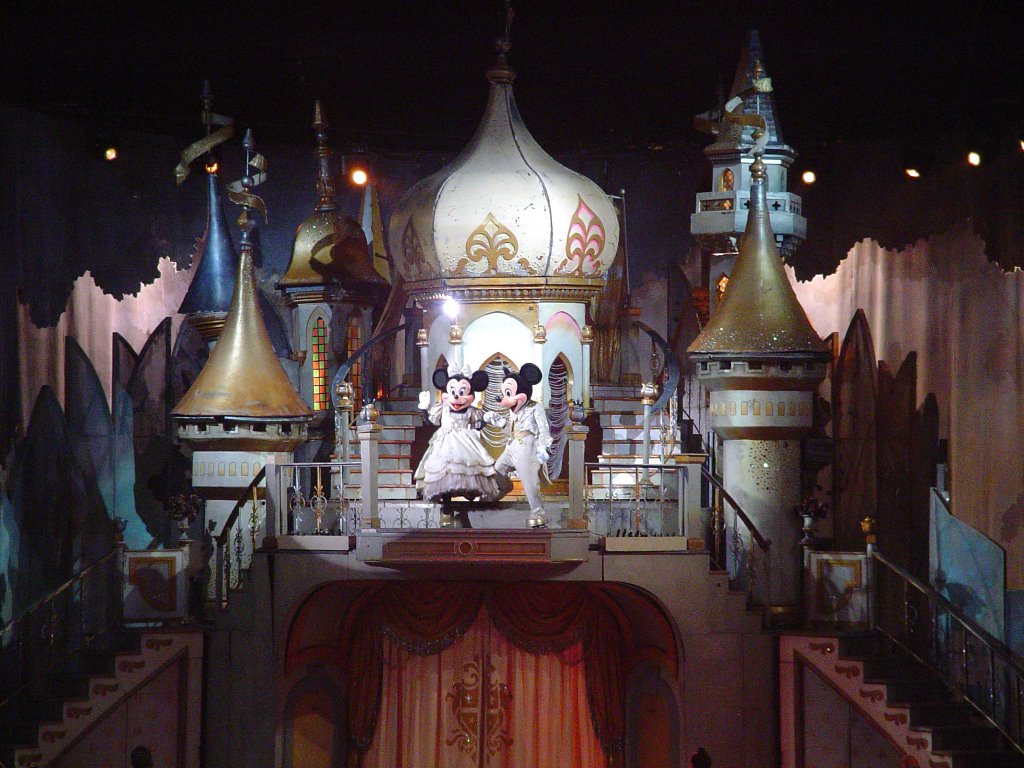
We went to see Disney on Ice tonight. It was a great show, and was all about the princesses. Each and every princess was there, but the main focus (half of the show) was on Cinderella. That would be alright if your little girl's favorite wasn't Princess Aurora (Sleeping Beauty, or Briar Rose for the informed). But each princess got a good bit of stage time, so it was alright.
This is my favorite shot from the night. I got this near the end of the show. I finally got my camera set up well by then, and the lighting was better as well. Next year, I am getting front row so I won't have to worry so much about the lighting.
One thing I thought was funny was that the event staff came around, and told me I couldn't film or use zoom. Little does she know I have zoom, and used it the whole night. It ain't much, only 3X, but without that the shots are near worthless from where we were sitting. What she doesn't know won't hurt her. I just think it is so silly for them to prohibit video and zoom lens. I know they are just trying to sell their videos, but its ridiculous. I mean, I can film all I want at all of the official Disney shows at Walt Disney World.
Overall, it was a great show, though. I think it was a little longer than the past few years. This year, counting the fifteen minute intermission, the show was 2 hours. I think most of the shows in the past were about fifteen to thirty minutes shorter. If you get the chance, I definitely recommend going to see this one, particularly if you have a little girl who likes the princesses, and even more so if she likes Cinderella.
Thursday, January 05, 2006
Photo of the Day

It has been quite some time since I posted a photo of the day. I am going to get back in the habit now that the holidays are over, and things are returning to normal around our place. Today's photo is my wife's new Longaberger purse she received for Christmas. The cloth pattern is called "Old Glory". The purse is nice and small, so it's easy to carry, but not so small that it's not functional.
Sudoku
I have spent the past few hours playing around with a Sudoku puzzle generator. I have been pondering creating a game for the Mac that lets you play Sudoku. Seems like a great puzzle game.
The basic idea is to fill in a 9x9 grid with the numbers 1 through 9, where each row contains each of the numbers 1 through 9 and each column contains each of the numbers 1 through 9, and each 3x3 grid within the 9x9 grid contains each of the numbers 1 through 9.
Here's a sample puzzle:
 5 3 - | - 7 - | - - -
 6 - - | 1 9 5 | - - -
 - 9 8 | - - - | - 6 -
-------+-------+------
 8 - - | - 6 - | - - 3
 4 - - | 8 - 3 | - - 1
 7 - - | - 2 - | - - 6
-------+-------+------
 - 6 - | - - - | 2 8 -
 - - - | 4 1 9 | - - 5
 - - - | - 8 - | - 7 9
And here is the solution to that sample:
 5 3 4 | 6 7 8 | 9 1 2
 6 7 2 | 1 9 5 | 3 4 8
 1 9 8 | 3 4 2 | 5 6 7
-------+-------+------
 8 5 9 | 7 6 1 | 4 2 3
 4 2 6 | 8 5 3 | 7 9 1
 7 1 3 | 9 2 4 | 8 5 6
-------+-------+------
 9 6 1 | 5 3 7 | 2 8 4
 2 8 7 | 4 1 9 | 6 3 5
 3 4 5 | 2 8 6 | 1 7 9
The other thought I had was to take the Sudoku puzzle in a solved mode, and turn it into another kind of puzzle. I'm probably more likely to do that since I think I could apply scoring, and I believe it would be easier to implement the concept of a harder puzzle to solve.
My idea is to take the completed puzzle, and begin to shift rows by 1 spot. The goal of the game would be to return the grid to a completed Sudoku puzzle. As the levels increaese more shifts would be made initially that would need to be undone. Scoring would be similar to Blokz. More points for solving puzzles faster, and the time allotment would be handled similarly to Blokz.
Wednesday, January 04, 2006
What a Day
Today has been quite the day. I awoke this morning not knowing anything of the mining tragedy, or the two reports that were printed by the same paper, as well as many other papers. I had stayed up late not watching sports, and not watching the news awaiting a press conference. There were many who did, but I was not one of them. I awoke, and thought of the day much like any other.
It was a little different, though. I was able to attend the first gathering of Charleston, WV area bloggers. Some have called it CAB... Others, the WV Bloggers meeting. It was a lot of fun, and I thoroughly enjoyed putting some faces to words. We discussed a variety of topics, from technology to the mining tragedy to who the authors of other blogs who didn't show up to the meeting. Of course everyone had coffee, and there were some scones consumed as well. We shared some "Hail-Mary" photos, even a "Hail-Mary" shot courtesy of a NASA satellite.
This evening my day was brought to a wonderful close while attending services at church. We had a great worship time, and it really helped to put things in perspective.
And now, I am just unwinding from the day's activities, thinking about what tomorrow may bring.
Tuesday, January 03, 2006
Go Mountaineers
Now I am not much of a sports buff, but I do make a point to watch some bowl games, and the super bowl, and I'll watch the final four in basketball. When the West Virginia Mountaineers play, I try and watch the games, particularly the bowl games.
This evening, the WVU played the Georgia Bulldogs in the Sugar Bowl. I let the game slip my mind but remembered in time to catch it from the 2nd quarter on. It was a great game with a lot of highs and lows on both sides. I always find it interesting to see the emotional roller coaster fans on each side go through. Late in the 4th quarter, WVU pulled off a great punt fake play that sealed the game. I'm glad I stayed up to watch.
Final score: 38 to 35, WVU wins over Georgia.
Monday, January 02, 2006
Blokz
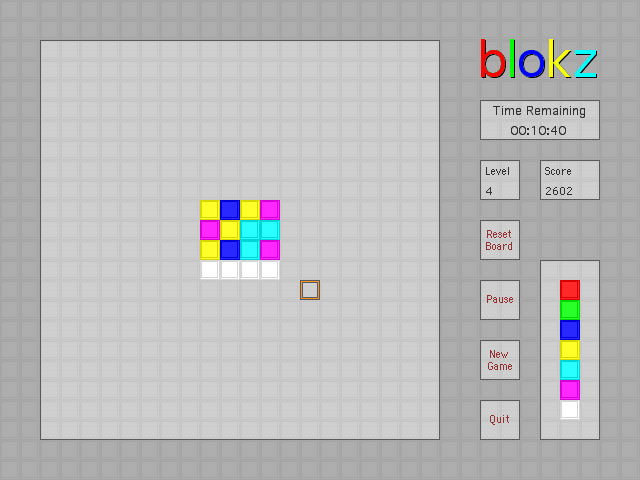
Here's another mind-bending puzzle game. The object of this game is simple: Change all of the blocks in the puzzle to white. You do this by clicking on blocks until all blocks in the puzzle are white. When you click a block, all adjacent blocks are changed by one color according to the key shown in the lower right. Red becomes green; Green becomes blue; Blue becomes yellow; Yellow becomes cyan; Cyan becomes purple; Purple becomes white; White becomes red.
When the game begins, the puzzle is a 2 by 2 grid, and you are given one minute to solve the puzzle. Successfully solve the puzzle, and the remaining time is carried over to the next level. In addition, the time alloted for a new level is level plus one minutes. So, level one, you have two minutes, plus the unused time from level zero. Level three gives you four minutes, plus the unused time from level two.
As the levels increase, the puzzle size increases.
Level 0 - 3, 2x2
Level 4 - 15, 4x4
Level 16 - 35, 6x6
Level 36 - 63, 8x8
Level 64 - 99, 10x10
Level 100 - 143, 12x12
Level 144 - 195, 14x14
Level 196 - 255, 16x16
Level 256 - 323, 18x18
Level 324+ 20x20
The complexity of the puzzle increases as the level increases as well. On level zero, the computer generates the puzzle by "clicking" one block. So to solve the puzzle, you should be able to simply click one block, turning all 4 blocks white. On level one, the computer does this twice, and thus the puzzle can be solved in 2 clicks. So for each level, the puzzle can be solved in level plus one clicks.
There could be multiple paths to correctly solving the puzzle. If at any point you decide that you have gone down the wrong road, you can reset the board to its original state. However, the time spent thus far on solving the puzzle is still spent, and is not returned. To reset the board, click the "Reset Board" button.
You can begin a new game at any point by clicking the "New Game" button. You will start over at level zero.
The game can be paused at any time by clicking the "Pause" button. While the game is paused, the time remaining to solve the puzzle remains unchanged. The board is hidden from view, and the "Pause" button flashes to indicate that the game is paused. Simply click the "Pause" button a second time to resume play.
When you are done playing the game, you can quit, by clicking the "Quit" button. The current game will end and the application will close.
This game should run fine on Mac OS X and Mac OS 9.
Sunday, January 01, 2006



Welcome to 2006
Well here we are in another year. This past year has held a lot of emotions for me, but overall, I'd say it was a good year for our family. We stayed up this evening to watch the ball drop on ABC, just like we do every year. No party. Nothing fancy. Just some family enjoying time together.
My wife and I spent the majority of New Year's Eve at the dealership. Yep, we got a new vehicle. Our old 1998 Ford Windstar had seen its better days, and we have been talking of getting rid of it for some time. But, since we bought it used, we still owed a little money on it. So when it got to the point that we owed about as much as it was worth, I knew we better do it. But more than that, the dealership had a great deal, and some great incentives. I'll post a photo or two or three in the morning when the light is better for photos.
For now, its a new 2005 Saturn Relay-3 FWD, with all the bells and whistles. The best part? ZERO PERCENT FINANCING!! Woohoo!
Subscribe to:
Posts (Atom)